Black Friday WhatsApp Marketing: Day-by-Day Plan for 2026
Black Friday is November 27, 2026. A dated WhatsApp plan to Cyber Monday: messages, segments, send times, Meta fees and what US stores do instead.
 Nicolas ProvostMay 12, 2026 · 22 min read
Summarize this article with an AI
 ChatGPT
 Claude
Table of contents (15)
Key takeaways
- Black Friday falls on Friday, November 27, 2026, and Cyber Monday on November 30: from November 4, that leaves 23 days to grow opt-ins, submit templates and raise your messaging limit.
- Meta bills each delivered marketing message by country, $0.0859 in France and $0.0635 in the UK on the rate card in effect since October 1, 2026, and only changes rates on the first day of a quarter.
- WhatsApp does not currently deliver marketing templates to US (+1) numbers, so US stores send Black Friday promotions by SMS or RCS and keep WhatsApp for order updates and replies.
- Meta caps the marketing messages each person receives from all businesses, so on November 27 send three messages to engaged segments instead of three blasts to the whole list.
Black Friday 2026 falls on Friday, November 27, and Cyber Monday on Monday, November 30, so a WhatsApp marketing campaign that starts on November 4 has 23 days to grow opted-in contacts, get templates approved and raise its sending limit. The plan below gives a date for every step, from list growth this week to a teaser on November 20, early access on November 26, three segmented sends on Black Friday and cart recovery through Cyber Monday. Meta bills each delivered marketing message by country ($0.0859 in France, $0.0635 in the UK, on its rate calculator) and does not deliver marketing templates to US numbers, so US stores run the same plan on SMS or RCS.
The dates come from the US federal holiday calendar: the Office of Personnel Management lists Thanksgiving Day on Thursday, November 26, 2026, which puts Black Friday on the 27th and Cyber Monday on the 30th. Meta's figures come from the sources linked in each section.
Black Friday 2026 WhatsApp calendar, from November 4 to Cyber Monday
| Date | What to do | Category |
|---|---|---|
| Wed Nov 4 to Sun Nov 8 | Check your messaging limit and quality rating in WhatsApp Manager, verify your business if you are still at 250, switch on your WhatsApp opt-in pop-up and chat widget, fix your offers | Setup |
| Mon Nov 9 to Fri Nov 13 | Write and submit every Black Friday template, build your segments, start click-to-WhatsApp ads to grow the list | Setup |
| Mon Nov 16 to Thu Nov 19 | Send one normal campaign to your engaged contacts, to use at least half of your messaging limit and check delivery | Marketing |
| Fri Nov 20 (D-7) | Teaser to the full opted-in list: "Reply EARLY for 24-hour early access" | Marketing |
| Tue Nov 24 (D-3) | Preview of the offer to the contacts who replied | Marketing |
| Thu Nov 26 (D-1), 6 pm | Early access link to the same contacts (Thanksgiving in the US) | Marketing |
| Fri Nov 27, 8 to 10 am | Launch: hero offer and three best sellers, to engaged contacts who have not bought in the last 24 hours | Marketing |
| Fri Nov 27, 1 to 3 pm | Stock alert to the morning's clickers and to carts left that morning | Marketing |
| Fri Nov 27, 6 to 9 pm | Last call to clickers who did not buy | Marketing |
| Fri Nov 27 to Mon Nov 30 | Cart reminders, order confirmations, shipping updates, replies to questions | Marketing, utility, service |
| Sat Nov 28 to Sun Nov 29 | One message at most, to buyers (cross-sell) or to clickers who did not buy | Marketing |
| Mon Nov 30 | Cyber Monday: offer extended or a new category, morning and evening | Marketing |
| Tue Dec 1 onward | Shipping and delivery updates, review requests once the parcel has arrived, back in stock alerts | Utility, marketing |
Messaging limit levels: Meta's messaging limits page, read on November 4, 2026.
Send times are the recipient's local time. The rest of this guide explains each line: what to send, to whom, and what Meta's rules change.
What Meta's rules change for Black Friday 2026
Five rules decide what a Black Friday campaign can send, and what it costs.
1. Each delivered message is billed, by category and country. Meta has charged per delivered template message, not per conversation, since July 1, 2025, according to its pricing documentation. On the rate card Meta has applied since October 1, 2026, published on its rate calculator and summarized in our WhatsApp Business pricing guide, the rates per delivered message are:
| Recipient's country | Marketing message | Utility message (order, shipping) | Service reply, after 1,000 free per number each month |
|---|---|---|---|
| United Kingdom | $0.0635 | $0.0220 | $0.0220 |
| France | $0.0859 | $0.0300 | $0.0300 |
| Germany | $0.1365 | $0.0550 | $0.0550 |
| Spain | $0.0707 | $0.0200 | $0.0200 |
| United States | Not delivered to US numbers | $0.0034 | $0.0034 |
Source: Meta's rate calculator, list rates in USD, rate card effective October 1, 2026. Full rate cards in 16 currencies: Meta's pricing documentation.
These rates hold through Cyber Monday: Meta's pricing calendar says rates change only on the first day of a quarter, with at least one month of notice, so the next possible change is January 1, 2027.
2. Replies are billed too, after a free allowance. Since October 1, 2026, Meta charges your free-form replies inside the 24-hour customer service window at the utility rate, after 1,000 free service messages per business phone number each month, according to its pricing documentation. Black Friday brings questions ("does it come in blue?", "when will it ship?"), so budget those replies as well.
3. Meta caps the marketing messages each person receives. Meta's per-user marketing limits page says WhatsApp may limit the number of marketing templates a person receives from any business in a given period, based on signals such as their recent read rate for marketing messages. Meta publishes no number. A send blocked by this limit returns error 131049, and the same per-user limits page asks you to wait at least 24 hours before resending. On Black Friday, many brands message the same people on the same day, which is why this plan sends to engaged segments first. One exception works in your favor: according to that page, when a person replies to a marketing message, a 24-hour customer service window opens, and marketing messages sent inside it do not count toward the limit.
4. Your messaging limit caps how many people you reach in 24 hours. Meta's messaging limits page, read on November 4, 2026, sets these rules:
- The limit belongs to the business portfolio and is shared by all its phone numbers.
- A new portfolio can message 250 unique customers in a moving 24-hour period, outside customer service windows.
- It moves to 2,000 when you complete a scaling path, such as verifying your business.
- It then rises to 10,000, 100,000 and unlimited automatically, if you send high-quality messages and used at least half of your current limit in the last 7 days. When the criteria are met, the limit goes up one level within 6 hours.
A store with 8,000 opted-in contacts needs the 10,000 level to send its launch to all of them on the morning of November 27: that is the reason for the mid-November campaign in the calendar.
5. WhatsApp does not deliver marketing templates to US numbers. The same per-user limits page states that WhatsApp does not currently deliver marketing template messages to users with United States phone numbers (a +1 dialing code and a US area code). Twilio's changelog dated the start of this block April 1, 2025. The US section below covers what that means for a store with American customers.
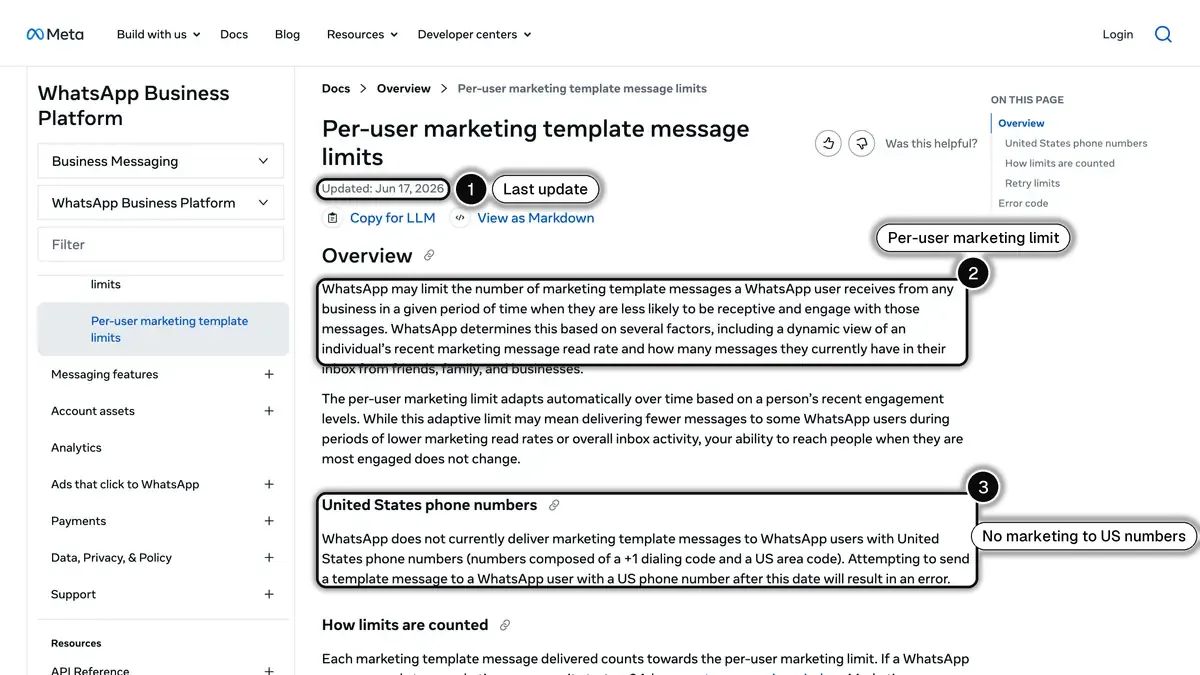 Source: Meta for Developers, per-user marketing template message limits (page updated June 17, 2026), read on October 24, 2026. In 1, the date of the last update; in 2, the per-user limit that applies in every country; in 3, the rule for US phone numbers.
What a Black Friday WhatsApp campaign costs: a worked example
The store is fictional: 8,000 opted-in WhatsApp contacts, 600 orders over the weekend, and the calendar above. Rates are Meta's, from the table above.
| Message | Date | Recipients | Category |
|---|---|---|---|
| Teaser | Nov 20 | 8,000 | Marketing |
| Preview to early access contacts | Nov 24 | 1,500 | Marketing |
| Early access | Nov 26 | 1,500 | Marketing |
| Launch | Nov 27 morning | 7,000 | Marketing |
| Stock alert | Nov 27 midday | 2,500 | Marketing |
| Last call | Nov 27 evening | 2,000 | Marketing |
| Cart reminders | Nov 27 to 30 | 1,200 | Marketing |
| Cyber Monday | Nov 30 | 5,000 | Marketing |
| Order confirmations and shipping updates | Nov 27 to Dec 4 | 1,200 (2 per order) | Utility |
| Replies to customer questions | Nov 20 to 30 | 2,500, of which 1,000 within the month's free allowance | Service |
| Line | UK contacts | French contacts |
|---|---|---|
| 28,700 marketing messages | $1,822.45 | $2,465.33 |
| 1,200 utility messages | $26.40 | $36.00 |
| 1,500 billed service replies | $33.00 | $45.00 |
| Meta fees for the season | $1,881.85 | $2,546.33 |
The arithmetic for France: 28,700 × $0.0859 = $2,465.33, plus 1,200 × $0.0300 = $36.00, plus 1,500 × $0.0300 = $45.00. Your platform's monthly plan comes on top. To judge the result, divide the revenue the messages bring in by these fees, and compare that ratio with your other channels on the ROAS break-even calculator.
Step 1: Grow your opted-in list before November 20
Your Black Friday WhatsApp reach is capped by the number of people who agreed to receive your messages. Meta's opt-in requirements ask you to collect that agreement before you message people, with your business name stated clearly. Every contact you add before the teaser on November 20 gets the whole sequence.
Four ways to grow the list in the next two weeks:
- An early access offer on your site. "Shop Black Friday 24 hours early: join us on WhatsApp." A pop-up or a chat widget that opens a WhatsApp chat with a prefilled message turns a visitor into a contact in one tap. Our Shopify popup apps comparison lists the tools.
- A WhatsApp link with a prefilled message ("I want Black Friday early access"), built with the WhatsApp link generator, in your emails and social profiles, and printed as a QR code on your packaging.
- Click-to-WhatsApp ads. When someone messages you from one of these ads and you reply inside the customer service window, Meta opens a free entry point window in which it does not charge your messages, for up to 7 days according to its pricing documentation. Use the conversation to ask for the opt-in. Our click-to-WhatsApp ads guide covers setup and measurement.
- Your email list. Send one email inviting subscribers to join the WhatsApp early access list.
Track net new opt-ins each day. The count on November 19 tells you how big your teaser send will be, and which messaging limit you need. For the consent wording and the proof to keep, read our guide to WhatsApp opt-in rules.
Step 2: Submit templates and build segments by November 13
Every message you send outside the 24-hour customer service window, which opens when a customer writes to you, needs a template approved by Meta, as its pricing documentation explains. Write all of them in the same week: the teaser, the preview, early access, the three Black Friday sends, the cart reminders, Cyber Monday, plus your order confirmation and shipping templates. A rejection discovered on November 26 costs you the send, so submit by November 13 and leave time to fix and resubmit. Our WhatsApp templates guide covers review times and the most common reasons for rejection.
Pick the category with care. Meta's template categorization guide gives a cart reminder as an example of a marketing message, and treats a template that mixes an order update with a promotion as marketing. Keep order confirmations and shipping updates strictly transactional, so they stay utility messages.
Build the segments before the rush, so each send on the day is one click:
| Segment | Who | Used for |
|---|---|---|
| Early access | Contacts who replied to the November 20 teaser | Preview, early access, launch |
| Engaged | Read or clicked a WhatsApp message in the last 60 days | Launch, Cyber Monday |
| Recent buyers | Ordered in the last 30 days | Cross-sell on Saturday, no discount needed |
| Clicked, did not buy | Clicked a Black Friday message, no order since | Stock alert, last call, Cyber Monday |
| Cart left | Started checkout without paying | Cart reminders |
| Not engaged | No read in the last 90 days | Leave out this week |
| US numbers | Phone numbers starting with +1 and a US area code | Leave out of WhatsApp marketing, reach by SMS or RCS |
Leaving out contacts who do not read your messages protects you twice: Meta names the recent read rate among the signals of its per-user limit, and blocks or reports from uninterested contacts pull down your quality rating. Our guide to customer segmentation for ecommerce covers how to build these groups from your order data.
Step 3: Teaser and early access, November 20 to 26
The week before Black Friday is where you build anticipation without giving the offer away, and where you find out who is really interested.
Friday, November 20 (D-7): the teaser, to the full opted-in list.
Hi {{1}}, our Black Friday starts Friday, November 27.
Want 24 hours of early access? Reply EARLY and we will send you the link on Thursday.
Everyone who replies goes into the early access segment. Measure the share of contacts who reply: that is the size of your most valuable segment for the next ten days.
Tuesday, November 24 (D-3): the preview, to the early access segment.
Hi {{1}}, early access opens Thursday at 6 pm.
Three collections will be on offer: {{2}}. Prices revealed Thursday.
Use a button per category and see which one gets the most clicks: it tells you what to lead with on Friday morning.
Thursday, November 26 (D-1), 6 pm: early access, to the same segment.
Hi {{1}}, your early access is open. Black Friday prices, 24 hours before everyone else.Link the button to a collection only this segment receives, and give the send its own discount code or UTM tag, so you can count its orders separately.
Step 4: Black Friday, November 27: three sends, three segments
Three sends on the day, each to a different group, rather than the same message three times to everyone.
8 to 10 am: the launch. To the engaged segment, minus anyone who bought in the last 24 hours. The hero offer and three best sellers, with a button to the Black Friday collection. Watch clicks and orders over the first two hours to decide what you push at midday.
1 to 3 pm: the stock alert. To the morning's clickers who did not buy, and to carts left that morning. "Here is what is still in stock in your size." Only send it when it is true.
6 to 9 pm: the last call. To clickers who still have not bought. "The offer ends at midnight." A real deadline, a few hours away.
Answer every reply fast. A customer's reply opens a 24-hour customer service window in which you can answer free-form, without a template, and help them choose; Meta bills those replies as service messages, per its pricing documentation. Our WhatsApp broadcast guide covers how to schedule and pace large sends.
Step 5: Cart recovery from November 27 to 30
A cart left during Black Friday week is a shopper who was one step from paying. A short WhatsApp sequence brings them back:
- 15 to 30 minutes after the cart is left: a reminder with the product, its image and a single button back to checkout.
- A few hours later: the stock or deadline argument, only if it is true for that product.
- The next morning: a last reminder, with a small incentive if your margin allows it.
Each of these reminders is a marketing message: it is billed at the marketing rate, it counts toward the per-user limit, and it does not reach US numbers. Keep the sequence short during Black Friday week, and give it its own tracking so you can compare it with your email reminders. WhatsApp abandoned cart recovery triggers the sequence from the store's checkout events, and our abandoned cart templates give wording you can adapt.
Step 6: The weekend and Cyber Monday, November 28 to 30
Saturday and Sunday: one message at most. Either a cross-sell to Black Friday buyers ("goes well with your order"), with no discount needed, or a reminder to clickers who did not buy. Not both to the same person.
Monday, November 30: Cyber Monday. Two sends: the morning to the engaged segment minus weekend buyers, with the offer extended or a new category, and the evening to Monday's clickers who did not buy. Contacts who clicked several times without buying are worth a personal message from your team ("anything I can help you with?").
Step 7: After Cyber Monday: shipping, reviews, back in stock
The orders of the weekend are where next year's list starts.
- Order confirmations and shipping updates, as utility templates. They are the messages customers wait for, and they answer the "where is my order?" question before it reaches your inbox. See WhatsApp order notifications.
- A review request once the parcel has arrived, not before. See review collection on WhatsApp.
- Back in stock alerts for the products that sold out on Friday, to the people who asked. See back in stock alerts.
- A post-purchase offer a few weeks later, for a second order before the holidays. Our WhatsApp post-purchase playbook covers the flows.
Black Friday for US stores: SMS and RCS carry the promotion
For a store whose customers have US phone numbers, the Black Friday plan above splits in two.
What WhatsApp cannot do for US customers. Meta's per-user limits page states that WhatsApp does not currently deliver marketing templates to US numbers. The teaser, early access, the three Black Friday sends, cart reminders and Cyber Monday are all marketing messages, so none of them reaches a +1 number with a US area code. A campaign that includes those numbers simply collects failed sends.
What WhatsApp still does. Order confirmations and shipping updates are utility messages and still deliver, at $0.0034 per message on Meta's North America rates (rate calculator, rate card effective October 1, 2026). Free-form replies to a customer who writes to you deliver inside the 24-hour customer service window. Conversations started from click-to-WhatsApp ads deliver too. Our guide to WhatsApp marketing in the USA covers these routes in detail.
What carries the promotion. For US customers, the teaser, the Black Friday sends and the cart reminders go by text message: SMS reaches any mobile number, and RCS adds the brand name, images and buttons on phones and carriers that support it. Both have their own consent rules in the US: our guide to SMS opt-in rules covers what to collect, and our abandoned cart text message templates cover the reminders. See SMS for Shopify stores and RCS marketing for the channels themselves.
In practice: build the same segments, split them by country, send WhatsApp to your non-US contacts and SMS or RCS to US numbers, on the same dates.
Ready-to-adapt Black Friday WhatsApp templates
Submit these as marketing templates by November 13. Variables in double braces are filled per customer.
Early access teaser (November 20). Quick reply button: "I'm in".
Hi {{1}}, our Black Friday starts Friday, November 27.
Want 24 hours of early access? Reply EARLY and we will send you the link on Thursday.
Black Friday launch (November 27, morning). Button: "Shop now".
Hi {{1}}, Black Friday is on: up to {{2}}% off {{3}}.
Our three most popular picks are in the collection below.
Stock alert (November 27, midday). Button: "See what's left".
Hi {{1}}, the {{2}} you looked at is still on offer, and stock is going.
Here is what is left in your size.
Last call (November 27, evening). Button: "Complete my order".
Hi {{1}}, our Black Friday offer ends tonight at midnight.
Your picks are one tap away.
Cyber Monday (November 30). Button: "Shop Cyber Monday".
Hi {{1}}, Cyber Monday is here: {{2}}, until midnight.Order confirmation (utility). No promotion in it, so it stays a utility message.
Hi {{1}}, thank you for your order {{2}}. We are preparing it now,
and we will send you the tracking link as soon as it ships.
For more wording by goal, the WhatsApp message template generator drafts templates you can edit, and the discount code generator creates the codes you need for per-send tracking.
Black Friday WhatsApp metrics to track
| Metric | How to compute it | What to do if it drops |
|---|---|---|
| Delivery rate | Delivered / sent | Look for error 131049 (per-user limit) and +1 US numbers in the send |
| Read rate | Read / delivered | Check the send time and the first line of the message |
| Click rate | Clicks / delivered | Shorten the message, make the button say what happens |
| Conversion rate | Orders / clicks | Check the landing page and the offer |
| Opt-out rate | Opt-outs / delivered, per send | Send less often, tighten the segment |
| Return on message fees | Attributed revenue / Meta fees | Move budget to the segments that buy |
No independent public benchmark exists for these rates on WhatsApp. Take your own baseline from your mid-November campaign, then compare each Black Friday send with it.
Running the plan with Kanal
Kanal is a WhatsApp marketing and sales app for e-commerce stores, available on the Shopify App Store, where it is rated 5.0. For this plan, it covers:
- Opt-ins: a pop-up and a chat widget that open WhatsApp on your store.
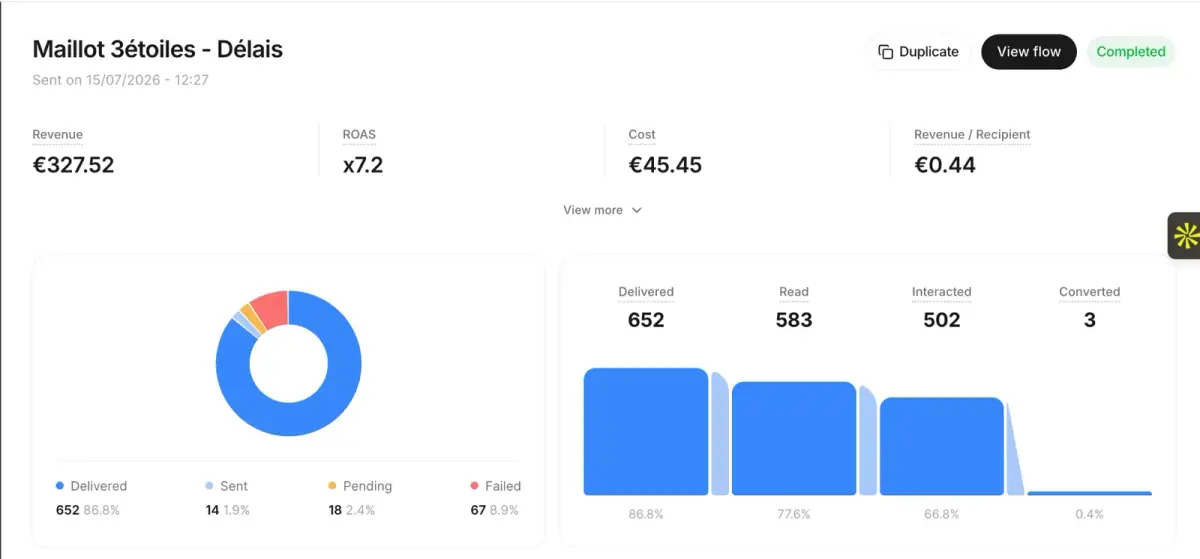
- Sends: WhatsApp campaigns to segments, with the revenue of each message tracked.
- Flows: abandoned cart recovery, order notifications, back in stock alerts, post-purchase offers and review collection, all as automations.
- The questions of the weekend: a shared team inbox, and on the Scale and Business plans an AI agent that answers order tracking questions after checking the customer's email and order number, and hands refunds, discounts and cancellations to your team.
- US customers: SMS and RCS are included from the Scale plan, sent from the same app to the same segments.
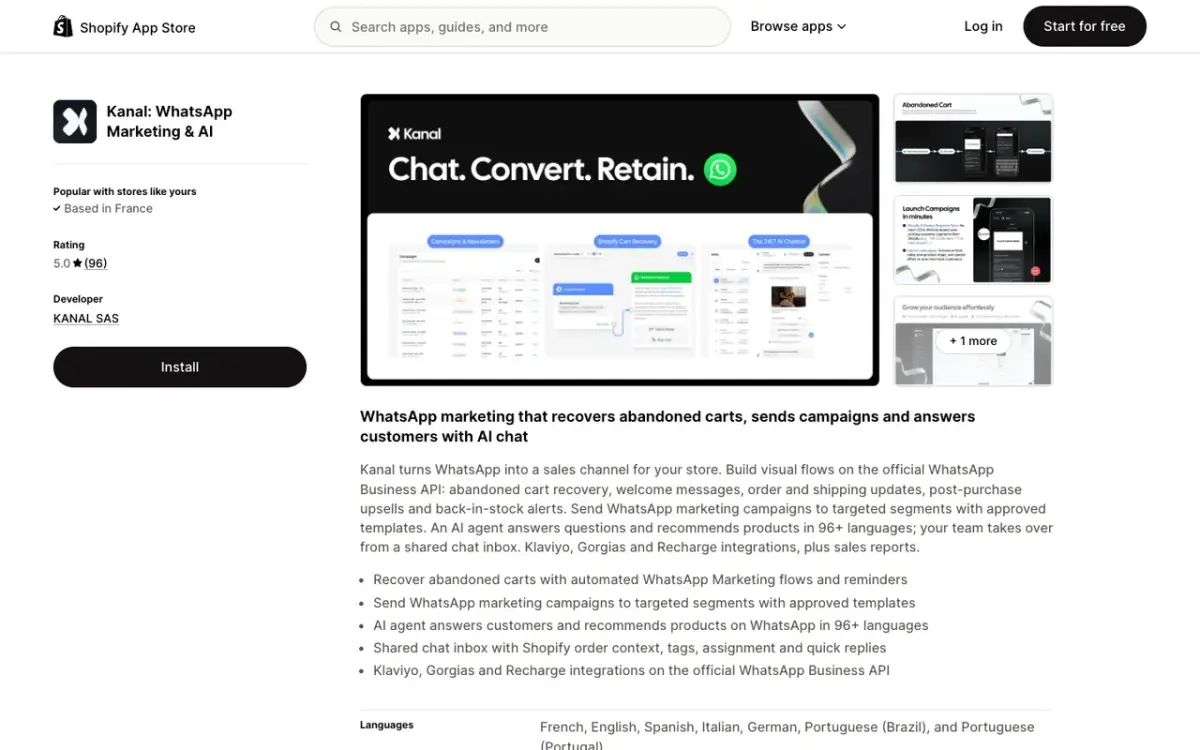 Kanal on the Shopify App Store.
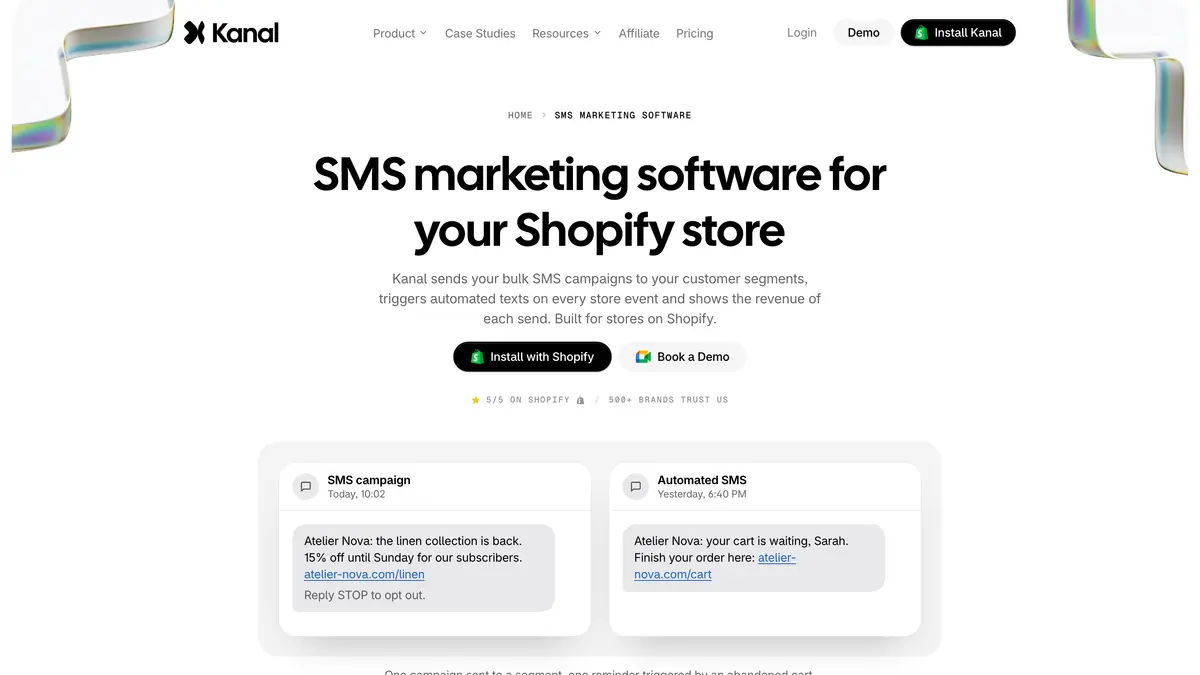 Kanal's SMS page: campaigns to segments and automated texts, included from the Scale plan.
Plans on the pricing page, as of November 4, 2026: Pro at €89 a month, Scale at €149 and Business at €350. Meta bills WhatsApp messages on top. Kanal sends no email, so your email platform keeps that part of the plan. To see the Black Friday sequence on your own catalog before November 13, book a demo.
Black Friday 2026 WhatsApp plan at a glance
| Item | Detail | Source |
|---|---|---|
| Key dates | Thanksgiving Thu Nov 26, Black Friday Fri Nov 27, Cyber Monday Mon Nov 30 | OPM federal holidays |
| Templates and segments | Ready by Fri Nov 13 | This plan |
| Teaser, preview, early access | Nov 20, Nov 24, Nov 26 at 6 pm | This plan |
| Marketing message | $0.0859 in France, $0.0635 in the UK, rate card effective Oct 1, 2026 | Meta rate calculator |
| Utility message | $0.0300 in France, $0.0220 in the UK, $0.0034 in the US | Meta rate calculator |
| Service replies | Utility rate after 1,000 free per number each month | Meta pricing documentation |
| Messaging limit | 250, 2,000, 10,000, 100,000, unlimited, per business portfolio | Meta messaging limits |
| US numbers | No marketing templates delivered, SMS or RCS for promotions | Meta per-user limits |
Black Friday on WhatsApp is decided in the three weeks before it: a list that grew, templates that were approved in time, a messaging limit high enough for the launch, and segments built before the rush. For the apps around it, our Shopify BFCM apps ranking covers the rest of the stack.
See Kanal on your own store
- Your campaigns and cart reminders on WhatsApp, starting from your own store
- Post-purchase offers, back-in-stock alerts, then the AI agent that advises your customers
- You leave with the plan that fits and its price
From €89/month
- brands
- 500+
- to set up
- 5 min
- open rate on WhatsApp
- +90%
Nicolas helps e-commerce brands grow revenue with WhatsApp marketing. With deep expertise in Shopify ecosystems and conversational commerce, he shares proven strategies for abandoned cart recovery, broadcast campaigns, and AI-powered customer engagement.